
How to Find Jenny in Jenny Mod: Spawn Location and Easy Methods
If you installed Jenny Mod but cannot find Jenny in your Minecraft world, the fastest method is usually to enter Creative Mode, search for a Jenny spawn egg, and place it on the ground. This works in many Java, Bedrock, and MCPE community builds and is much more reliable than wandering through the world hoping she appears. Make sure you installed the correct files from our Jenny Mod page.
However, there is no single Jenny location that works with every version. Some Java releases and community builds place Jenny near plains, villages, or custom structures, while other versions require a spawn egg or another pack-specific method. Your Minecraft edition and the exact mod build determine how you can find her.
Quick Answer: Where Can You Find Jenny?
The easiest way to find Jenny in Jenny Mod is to open a Creative world and search your inventory for Jenny or Jenny Spawn Egg. Select the egg and use it on a clear piece of ground.
If your version supports natural spawning, Jenny may instead appear around plains, villages, or a custom structure. These locations are not guaranteed across every release, so the spawn egg should usually be your first test.
Minecraft Version | Best Method to Find Jenny |
Java Edition | Spawn egg or version-specific structure search |
Bedrock Edition | Activate packs and use Creative spawn egg |
MCPE / Android | Bedrock add-on + spawn egg |
iPhone / iPad | Bedrock add-on + spawn egg |
Survival Mode | Depends on natural spawning supported by the build |
Why Can't I Find Jenny After Installing the Mod?
Jenny is not a standard Minecraft mob such as a cow, zombie, or villager. She is a custom NPC added by third-party mod files, so the game needs the correct mod or add-on components before it can create her.
Depending on your version, Jenny may be added through a custom entity, spawn egg, generated structure, or Bedrock Behavior Pack. If those files are missing or disabled, searching the world for hours will not solve the problem.
She spawns alongside the other Jenny Mod characters in specific biomes.
Your Version May Use a Different Spawn Method
Different community releases use different systems.
A version may use:
- A Creative Mode spawn egg
- Natural spawning
- A custom house or structure
- A pack-specific summon item
- A command documented by the developer
This is why two tutorials can give different answers and both may apply to different Jenny Mod builds. Current guides themselves disagree about whether natural spawning is available universally. Spawn rates differ by build, so check Jenny Mod CurseForge for the right version.
How to Find Jenny Using the Spawn Egg
Using the Jenny spawn egg is one of the easiest ways to find Jenny. It also helps you check if the mod is working correctly.
Instead of searching the whole Minecraft world, you can use the spawn egg to create Jenny in a few steps.
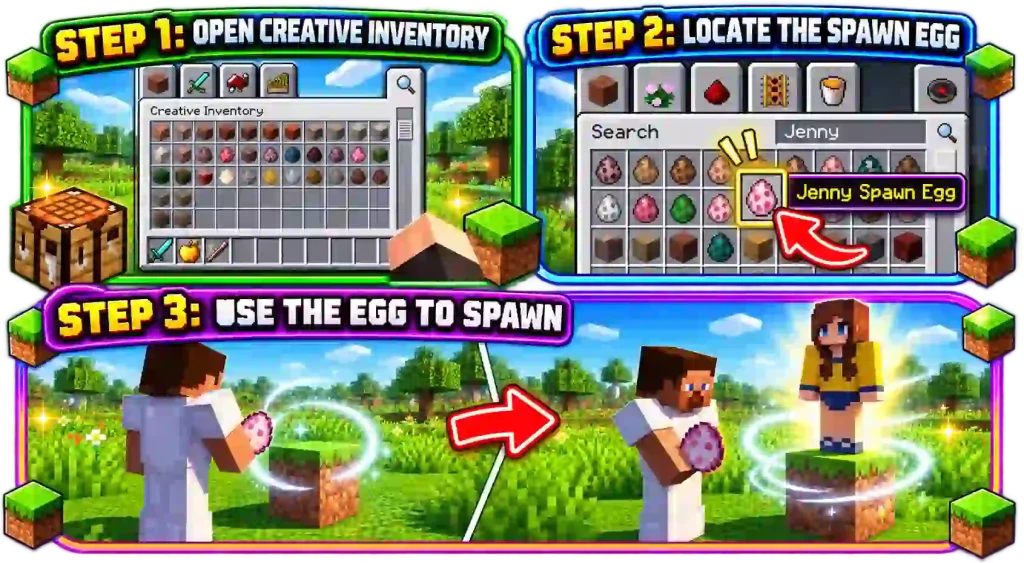
Step 1 - Enter Creative Mode
Create a new Minecraft world in Creative Mode.
You can also use a separate Creative world to test the mod before using it in your main Survival world.
Step 2 - Open Your Inventory
On Minecraft Java Edition, press:
E
On Bedrock or mobile, open your normal inventory.
Use the search box if your version has one.
Step 3 - Search for Jenny
Type:
Jenny
Look for an item such as:
Jenny Spawn Egg
The name or look of the egg may be different in some versions.
Step 4 - Put the Egg in Your Hotbar
Move the Jenny spawn egg to your hotbar.
Then find a clear and flat area where you have enough space to spawn her.
Step 5 - Spawn Jenny
Select the spawn egg and use it on the ground.
On Java Edition, this usually means right-clicking.
On a phone or tablet, tap the ground while holding the spawn egg.
If the mod is installed correctly and includes Jenny, she should appear.
How to Find Jenny in Jenny Mod Java Edition
If you are using the Java version, first make sure the mod is loaded correctly. Once you find her, our Jenny Mod gameplay guide covers what happens next.
The classic Jenny Mod setup is commonly linked to Minecraft Java Edition 1.12.2 with Forge. Your Minecraft version, Forge version, and Jenny Mod file need to be compatible.
Check That Jenny Mod Is Loaded
Start Minecraft using the correct Forge profile.
Then check the Mods menu to see if Jenny Mod is listed.
If Jenny Mod does not appear, fix the installation before searching for Jenny.
Common problems include:
- Wrong Minecraft version
- Wrong Forge version
- Mod file in the wrong folder
- Damaged mod file
- Missing dependency
- Another mod causing a conflict
Try the Creative Spawn Egg First
Create a Creative Mode test world.Open your inventory and search for Jenny. If the Jenny spawn egg appears, use it to test the character.
If Jenny spawns successfully, the mod is working and you do not need to search the world for her.
Search Plains and Villages
If your version supports natural spawning, you can check areas such as:
- Plains
- Villages
- Areas near villages
- Custom buildings
- Cottage-style structures
These locations can change between versions. A location that works in one Jenny Mod build may not work in another.
Tip: If you cannot find Jenny, use the spawn egg first. It is usually much faster than searching the world.
How to Find Jenny in Bedrock Edition
Finding Jenny on Bedrock starts with checking that the add-on is active. Bedrock versions usually use Resource Packs and Behavior Packs instead of Java Forge files. The spawn logic was set by the Jenny Mod creator.
Activate the Resource Pack
Open your world settings and select Resource Packs. Find the Jenny add-on and move it to the active packs. This pack usually controls Jenny’s model and textures.
Activate the Behavior Pack
Open Behavior Packs in your world settings. Find the Jenny add-on and activate it there. This pack controls Jenny’s behavior and spawning.
Enable Required Experiments
Some Bedrock add-ons need specific experimental settings. Check the instructions that came with your add-on first. Only enable the options required by your version.
Search for the Jenny Spawn Egg
Enter a Creative Mode world and open your inventory.Search for Jenny or Jenny Spawn Egg. Use the egg on the ground to spawn Jenny.
How to Find Jenny in MCPE
Minecraft Pocket Edition now belongs to the wider Bedrock ecosystem, so Jenny Mod MCPE versions normally use Bedrock-style add-ons rather than Java Forge files. On Apple devices she won’t appear at all, explained in Jenny Mod iOS.
After importing your compatible add-on, activate its required Resource and Behavior Packs and use a Creative world to look for the Jenny spawn egg.
Fastest MCPE Method
Use this order:
- Import the Jenny add-on.
- Create a new test world.
- Activate the Resource Pack.
- Activate the Behavior Pack.
- Enable required experiments.
- Enter Creative Mode.
- Open the inventory.
- Search for Jenny.
- Select the spawn egg.
- Tap the ground.
If Jenny appears, your add-on is functioning.
How to Find Jenny on iPhone and iPad
Jenny Mod on iPhone and iPad uses the Minecraft Bedrock add-on system. After importing the .mcaddon or .mcpack file, activate the required packs. Then create a Creative test world to look for Jenny.
Find Jenny After Importing the iOS Add-On
Open Minecraft and enter a Creative Mode world. Open the Creative inventory and search for Jenny or her spawn egg. If the egg is missing, check your Resource and Behavior Packs.
Can Jenny Spawn Naturally?
Jenny’s natural spawning depends on the version you are using. Some builds may use villages, plains, or custom structures. Other versions may require the Jenny spawn egg.
Why Natural Spawn Information Conflicts
Different Jenny Mod builds can use different spawning systems. One version may support natural spawning, while another needs a spawn egg. Always check the instructions for your exact version.
How to Know if Your Version Has Natural Spawning
Check the information provided with your Jenny Mod file. Look for details about spawning, structures, or spawn eggs.
Useful sources include:
- Download page
- README file
- Installation guide
- Character guide
- Changelog
- Spawn instructions
Can You Find Jenny in Survival Mode?
You may find Jenny in Survival if your version supports natural spawning. Some versions may also place her inside custom structures. If your build needs a spawn egg, test it in Creative Mode first.
Test Before Searching in Survival
Use a separate Creative world to test your installation first. This helps you confirm that Jenny is available and working correctly.
Follow these steps:
- Create a Creative test world.
- Search for Jenny’s spawn egg.
- Spawn Jenny.
- Check her model and behavior.
- Test your version’s Survival spawning method.
Can You Summon Jenny With a Command?
Some Jenny Mod versions may support custom summon commands. However, the correct entity ID can change between different builds. Using a command from another version may not work.
Use the Command Provided by Your Version
If your version includes a summon command, use the exact command provided. Do not copy a command from a different Jenny Mod build without checking it. The command may depend on the following:
- Namespace
- Entity ID
- Character name
- Command syntax
- Minecraft version
For a quick test, the Creative spawn egg is usually easier.
What to Do If Jenny Spawn Egg Is Missing
A missing spawn egg does not always mean the mod is broken. Your version may use another spawning method or may not include Jenny. Check the installation before searching through different biomes.
Check Your Minecraft Edition
First, confirm which Minecraft edition you are using.
Java and Bedrock use different mod and add-on formats.
Check whether you have:
- Minecraft Java Edition
- Minecraft Bedrock Edition
- Minecraft on Android
- Minecraft on iPhone or iPad
Use a file that matches your Minecraft edition.
Check the Mod Version
Make sure your Minecraft version supports the Jenny Mod build. An incompatible version can prevent custom characters from loading. Check both the Minecraft and mod version before testing again.
Check Behavior and Resource Packs
Bedrock add-ons may require both pack types to work correctly. The Behavior Pack handles gameplay and character behavior. The Resource Pack usually handles models, textures, and other visuals.
Try a New World
Create a new Creative world with only the required Jenny packs enabled.
This can help you find conflicts with other add-ons or old settings.
Check these possible causes:
- Other add-ons
- Old world settings
- Experimental features
- Corrupted world data
- Missing pack dependencies
Jenny Is Invisible After Spawning
If Jenny spawns but you cannot see her, her model or textures may not be loading correctly. This is usually caused by a Resource Pack problem. Check the pack settings before reinstalling the mod.
Check the Resource Pack
Open World Settings > Resource Packs and make sure the Jenny Resource Pack is active. Restart your world after enabling it. Then spawn Jenny again to check if her model appears.
Check for Add-On Conflicts
Temporarily disable other texture packs and add-ons from your world. Create a new test world with only the Jenny add-on enabled. If Jenny appears there, another pack may be causing the problem.
Jenny Spawn Egg Does Nothing
If the Jenny spawn egg does not create the character, your version may have a compatibility or installation problem. Check the Minecraft version, mod version, and required packs. Common causes include a missing Behavior Pack or damaged add-on file.
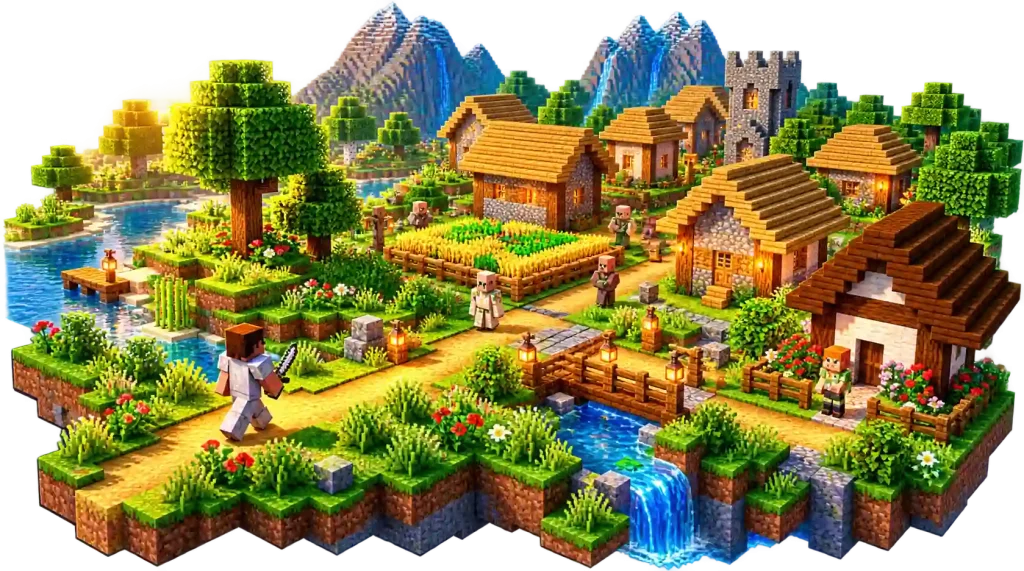
Best Places to Look for Jenny Naturally
If your version supports natural spawning, start by checking plains and villages. Some builds may also generate a custom cottage or house for Jenny. These locations are general guides and are not guaranteed in every version.
Area | Check It? | Notes |
Plains | Yes | Commonly mentioned location |
Villages | Yes | Used by some builds |
Village outskirts | Yes | Custom structures may appear |
Custom cottage or house | Check version | Not in every build |
Forests | Usually no | Other characters may appear here |
Caves | No | More commonly linked with Goblins |
Nether | No | Galath and Manglelie are linked here |
End | Usually no | Not a common Jenny location |
How to Know Jenny Mod Is Installed Correctly
Before searching for Jenny, make sure the mod or add-on is working correctly. The exact checks depend on whether you are using Java or Bedrock. A Creative Mode spawn egg is one of the easiest ways to test the installation.
Check Java Edition
Make sure your Minecraft and Forge versions match the Jenny Mod version. Check that Jenny Mod appears in the loaded mods list. Then open Creative Mode and look for Jenny’s spawn egg.
Check Bedrock and MCPE
Make sure the Jenny add-on imported successfully without errors. Activate the required Resource Pack and Behavior Pack in your world settings. Then open Creative Mode and search for Jenny’s spawn egg.
Where Are the Other Jenny Mod Characters Found?
Jenny is only one character found in many Jenny Mod community releases. Other characters are linked with different biomes, structures, and areas. Use the table below as a quick location guide.
Character | Commonly Associated Location |
Jenny Belle | Plains / villages / spawn egg |
Ellie Walls | Forests |
Allie | Desert temples / dungeons |
Luna | Oceans / rivers |
Bia Prowell | Birch forests |
Bee Girl | Forests / flower areas |
Slime Girl | Swamps / wet areas |
Galath | Nether |
Manglelie | Nether |
Goblin | Caves / underground |
Kobolds | Overworld |
These locations are general references and can change between Jenny Mod versions. For more details about each character, abilities, and locations, link to your Jenny Mod Characters guide.
Frequently Asked Questions
Where is Jenny located in Jenny Mod?
There is no universal fixed location.Some community versions associate Jenny with plains, villages, or custom structures, while others require players to create her using a spawn egg.
What is the fastest way to find Jenny?
Enter Creative Mode, open your inventory, search for Jenny’s spawn egg, and use it on the ground.This is the easiest way to test many current Java, Bedrock, and MCPE builds.
Does Jenny spawn in every village?
No.Even versions that use village-related or structure-based spawning do not guarantee that Jenny will appear in every Minecraft village.
Does Jenny spawn in plains?
Some community builds and guides associate her with plains.However, other versions rely entirely on a spawn egg, so checking your build documentation is more reliable than assuming plains spawning is universal.
Does Jenny have a house?
Some community versions refer to a cottage or custom structure associated with Jenny.
It is not a guaranteed feature of every release.
Can you spawn Jenny with an egg?
Yes, many Jenny Mod versions provide a Creative Mode spawn egg.Search your Creative inventory for Jenny or a similarly named custom spawn item.
Can I find Jenny without Creative Mode?
If your specific version supports natural spawning, structures, or another Survival-compatible discovery method, yes.If your build relies on a Creative spawn egg, you may need to use Creative Mode to create her.
Why can't I find Jenny in my world?
Possible reasons include an incompatible mod version, missing Behavior or Resource Packs, the wrong Minecraft edition, disabled experimental features, or using a version that does not support natural spawning.
Why is there no Jenny spawn egg?
Possible reasons include an incompatible mod version, missing Behavior or Resource Packs, the wrong Minecraft edition, disabled experimental features, or using a version that does not support natural spawning.
Do I need Forge to find Jenny?
For classic Java Forge builds, yes, you need the compatible Forge setup required by the mod.Bedrock, MCPE, iPhone, and iPad add-ons do not use Forge in the same way.
Final Thoughts
The easiest answer to how to find Jenny in Jenny Mod is to start with a Creative Mode test world and search for the Jenny spawn egg. If the egg appears and Jenny spawns correctly, you know the character is installed. This method is generally more reliable than searching random biomes.
If you want to find Jenny naturally, check the instructions for your exact release first. Some versions associate her with plains, villages, or custom structures, while others depend entirely on manual spawning. Matching the method to your Java, Bedrock, MCPE, or iOS version will save you far more time than searching the world without knowing which spawn system your build uses.
Pingback: Jenny Mod Gameplay 2026: Everything You Can Do
Pingback: Jenny Mod GIFs & Animation: See Every Move In Action (2026)